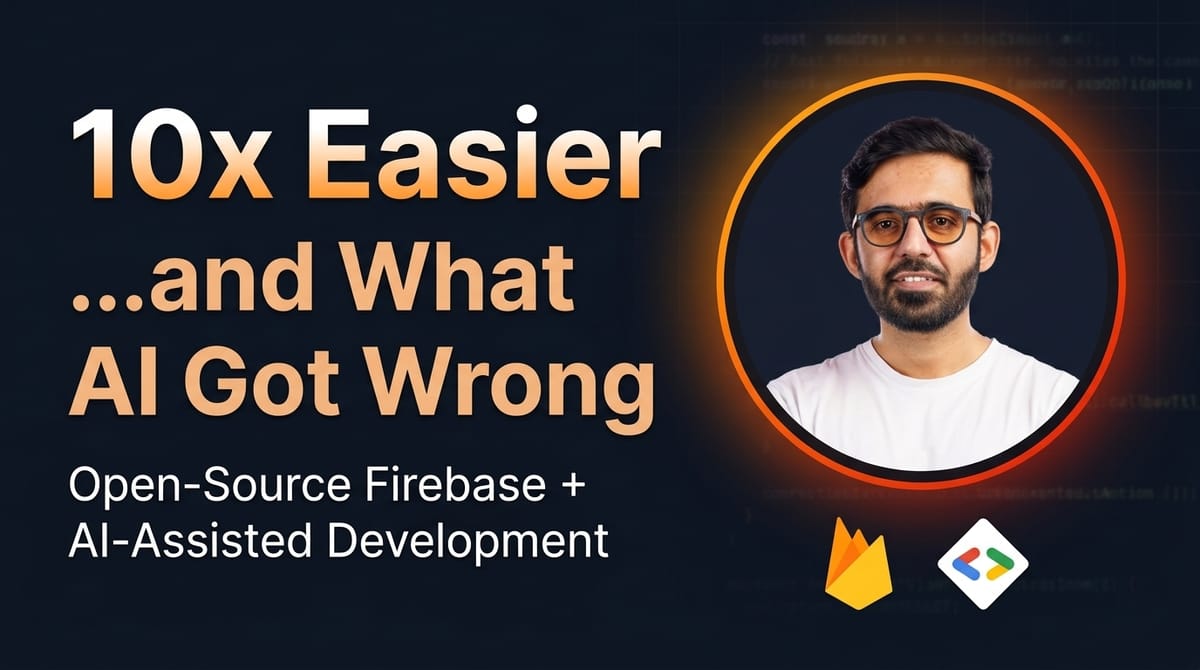
How I Made Contributing to an Open-Source Firebase Web App 10x Easier...and What AI Got Wrong Along the Way
Firebase emulators, seed scripts & AI debugging: how I made open-source contribution trivial.

"Just clone the repo and runnpm install."
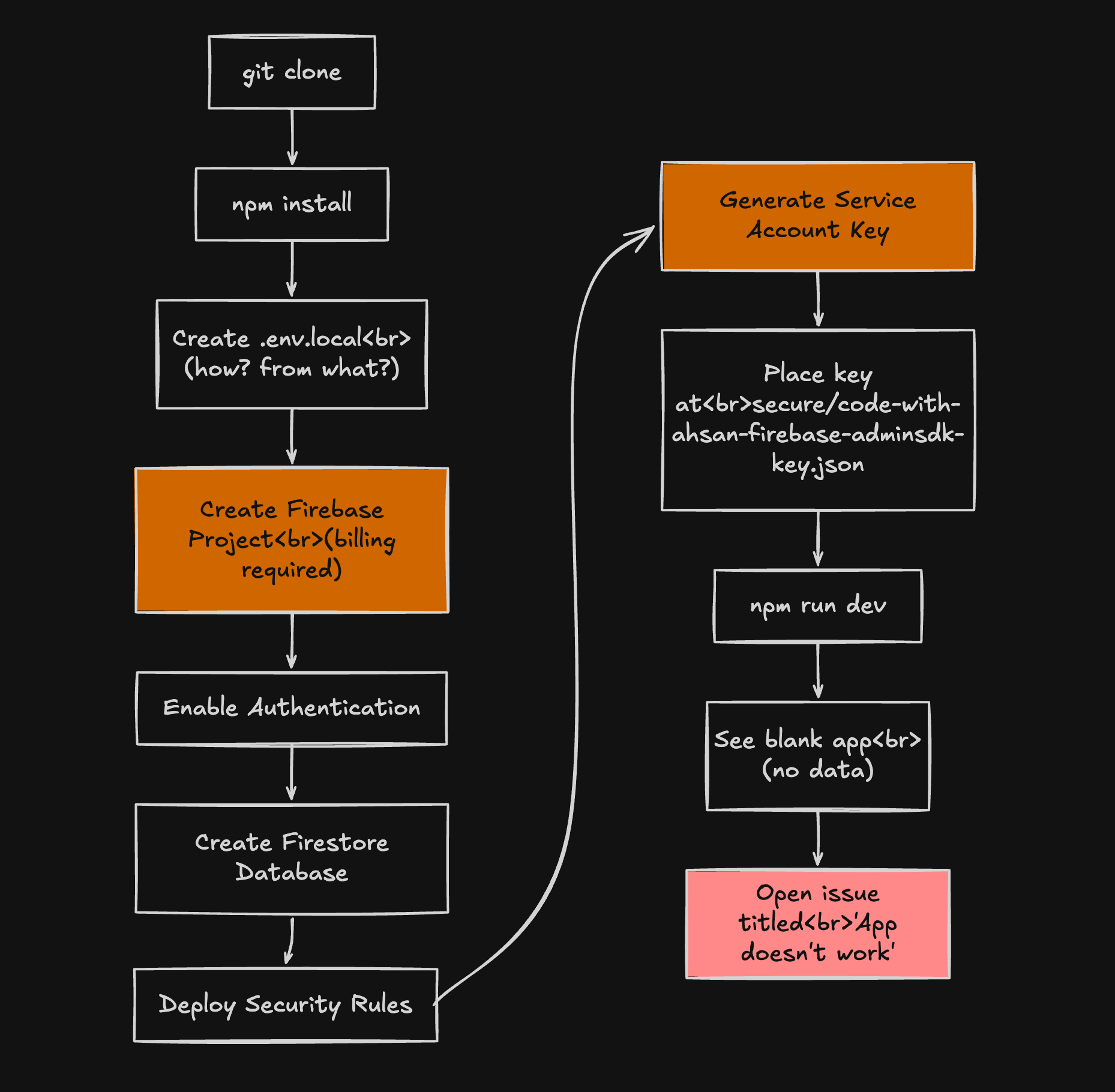
Sure. And then what? Paste your production Firebase credentials into a.envfile you had to guess the shape of? Hope you already have a service account key sitting in asecure/folder that nobody told you about? Stare at a blank screen wondering if the app is broken or if you just need to have attended a secret meetup to get the tribal knowledge?
This is the story of a PR that turned a "good luck figuring it out" contributor experience into a sub-5-minute setup. It involved Firebase emulators, a nasty Turbopack gotcha, a race condition inside Firebase Auth initialization, a seed script, an admin auth system that secretly needed a Firestore document to exist, and a Vercel build failure that only showed up after the fix was "done."
If you've ever maintained an open-source project and wondered why you keep getting issues titled "App doesn't start," this one's for you.
The Platform: CodeWithAhsan
CodeWithAhsan is a community platform for mentorship, project collaboration, learning roadmaps, and courses. The stack:
- Next.js 16 (App Router, Turbopack)
- React 19
- Firebase (Auth + Firestore + Storage)
- Tailwind CSS v4 / DaisyUI
- Vitest
It's open-source. People are supposed to be able to contribute. The problem is that "open source" and "easy to contribute to" are not synonyms. One is a license, the other is a design decision.
Before this PR, contributing required: your own Firebase project, your own Firestore security rules deployment, a service account JSON file at a hardcoded path, and the patience of a saint.
The Architecture We Were Moving Toward
Before diving into each problem, here's the target state. Firebase Emulators become the single local dependency — no cloud project needed, no credentials, no billing:
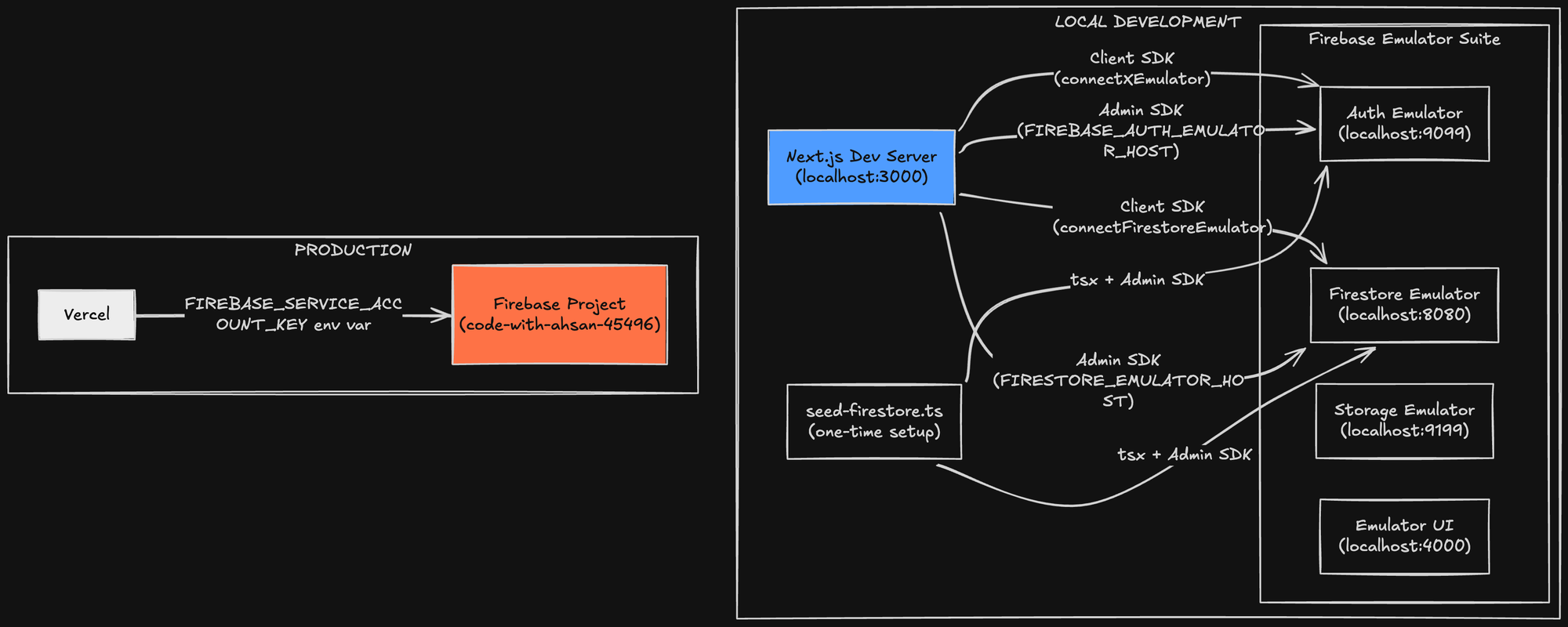
The key insight is that the local and production paths are completely separate. Local development uses emulators exclusively; no internet, no credentials, no billing surprises. Production uses real Firebase via environment variables. The same codebase serves both, controlled entirely by which environment variables are present.
Problem 1: No .env.example, No Emulators, No Mercy
What Broke
New contributor clones the repo. There's no .env.example. They look at the code, find references to NEXT_PUBLIC_FIREBASE_API_KEY and friends, create a .env.local and... do what exactly? Sign up for Firebase? Create a project? Enable Auth? Set up Firestore? Deploy security rules?
The answer was: yes, all of that. Before writing a single line of code.
The Fix
Two changes: a .env.example file with safe placeholder values, and an npm run emulators script.
# .env.example
NEXT_PUBLIC_FIREBASE_API_KEY=AIzaSyDemoKeyForLocalDevelopmentOnly000
NEXT_PUBLIC_FIREBASE_AUTH_DOMAIN=demo-codewithahsan.firebaseapp.com
NEXT_PUBLIC_FIREBASE_PROJECT_ID=demo-codewithahsan
NEXT_PUBLIC_FIREBASE_STORAGE_BUCKET=demo-codewithahsan.appspot.com
NEXT_PUBLIC_FIREBASE_MESSAGING_SENDER_ID=000000000000
NEXT_PUBLIC_FIREBASE_APP_ID=1:000000000000:web:0000000000000000000000

# Leave blank for local development — emulators handle everything
FIREBASE_SERVICE_ACCOUNT_KEY=
FIREBASE_PRIVATE_KEY=
FIREBASE_CLIENT_EMAIL=
// package.json
"emulators": "firebase emulators:start --project demo-codewithahsan --only auth,firestore,storage"
The Key Insight: Firebase Emulators Accept Fake API Keys
Here's something that isn't well-documented: Firebase emulators accept any string that looks like an API key. The format AIzaSy... is a known-good prefix. AIzaSyDemoKeyForLocalDevelopmentOnly000 works perfectly. No network validation happens — the emulators just need something in that field to not crash on startup.
The --project Flag Is Not Optional
This detail bit us later and is worth front-loading: the --project demo-codewithahsan flag in the emulators command is not cosmetic. It defines the namespace that the Firestore emulator uses. If your seed script writes to demo-codewithahsan and your emulators start under the default .firebaserc project (code-with-ahsan-45496), the data goes into a completely separate namespace. It exists, but it's invisible in the Emulator UI and unreachable from your app. More on this in the seed section.
Problem 2: Turbopack's Static require() Resolution Broke the Build for Everyone
What Broke
firebaseAdmin.ts had this code:
// The old code — looked safe, wasn't
try {
  const serviceAccount = require("../../secure/code-with-ahsan-firebase-adminsdk-key.json");
  admin.initializeApp({ credential: admin.credential.cert(serviceAccount) });
} catch (e) {
  // "it'll be fine"
}
The author's intent was clear: if the file doesn't exist, catch the error and move on. Reasonable thinking. Wrong mental model.
The author was me btw. *evil-grin
Why It Actually Broke
Turbopack (and webpack before it) resolves require() paths at compile time. The bundler sees require("../../secure/code-with-ahsan-firebase-adminsdk-key.json") and immediately tries to resolve that path during the build — before any runtime code can catch anything. The try/catch only catches runtime errors. The bundler emits a build error before the code ever runs.
This is the same reason you can't do require(someVariable) with dynamic values in bundled code — the bundler needs to know the path statically.
The server crashed on startup for literally every contributor who didn't have that specific JSON file at that specific path. Which was everyone.
The Fix: A Priority Chain Without Any require()
Remove the hardcoded path. Replace it with a runtime priority chain that checks environment variables:
// firebaseAdmin.ts

import * as admin from "firebase-admin";

if (!admin.apps.length) {
  if (process.env.FIREBASE_SERVICE_ACCOUNT_KEY) {
    // Production path 1: full JSON blob in env var (Vercel, etc.)
    const serviceAccount = JSON.parse(process.env.FIREBASE_SERVICE_ACCOUNT_KEY);
    admin.initializeApp({
      credential: admin.credential.cert(serviceAccount),
    });
  } else if (process.env.FIREBASE_PRIVATE_KEY && process.env.FIREBASE_CLIENT_EMAIL) {
    // Production path 2: individual key fields
    admin.initializeApp({
      credential: admin.credential.cert({
        projectId: process.env.NEXT_PUBLIC_FIREBASE_PROJECT_ID,
        privateKey: process.env.FIREBASE_PRIVATE_KEY.replace(/\\n/g, "\n"),
        clientEmail: process.env.FIREBASE_CLIENT_EMAIL,
      }),
    });
  } else if (process.env.NODE_ENV === "development") {
    // Local dev: point everything at emulators BEFORE creating any client
    process.env.FIRESTORE_EMULATOR_HOST ??= "localhost:8080";
    process.env.FIREBASE_AUTH_EMULATOR_HOST ??= "localhost:9099";
    admin.initializeApp({ projectId: "demo-codewithahsan" });
  } else {
    // Cloud Run / GKE: Application Default Credentials
    admin.initializeApp({
      credential: admin.credential.applicationDefault(),
    });
  }
}
Four distinct environments. Four initialization paths. No file system dependencies. No require().
The ??= Operator: Small Detail, Large Consequence
The ??= (nullish assignment operator) on the emulator host variables deserves a callout:
process.env.FIRESTORE_EMULATOR_HOST ??= "localhost:8080";
This reads as: "set this to localhost:8080 only if it is currently null or undefined." Why does this matter?
The Firebase Admin SDK reads these environment variables at the moment admin.firestore() is first called — not when admin.initializeApp() runs. If you call admin.firestore() anywhere before this line executes, the emulator host won't be set and requests go to production Firebase.
Using ??= instead of = ensures we respect any value already in the environment (useful for CI or custom emulator ports) while guaranteeing the fallback for standard local dev. A = here would silently override legitimate environment configuration.
Guarding the Storage Bucket Export
There was a second crash in the same file. The original code exported a storage bucket unconditionally:
// Crashes when NEXT_PUBLIC_FIREBASE_STORAGE_BUCKET is undefined
export const storage = admin.storage().bucket(
  process.env.NEXT_PUBLIC_FIREBASE_STORAGE_BUCKET
);
In emulator mode (using the placeholder .env.example), this env var is present but might not map to a real bucket. More importantly, any code path that hits this export in environments where the variable wasn't set would throw synchronously on module load. The fix: a conditional export:
export const storage = process.env.NEXT_PUBLIC_FIREBASE_STORAGE_BUCKET
  ? admin.storage().bucket(process.env.NEXT_PUBLIC_FIREBASE_STORAGE_BUCKET)
  : (null as unknown as ReturnType<admin.storage.Storage["bucket"]>);
Is null as unknown as ReturnType<...> a beautiful type? No. Is it honest? Yes — it says "this might be null, and that's intentional in some environments." Callers should check before using it.
Problem 3: A Race Condition Inside Firebase Auth Initialization
What Broke
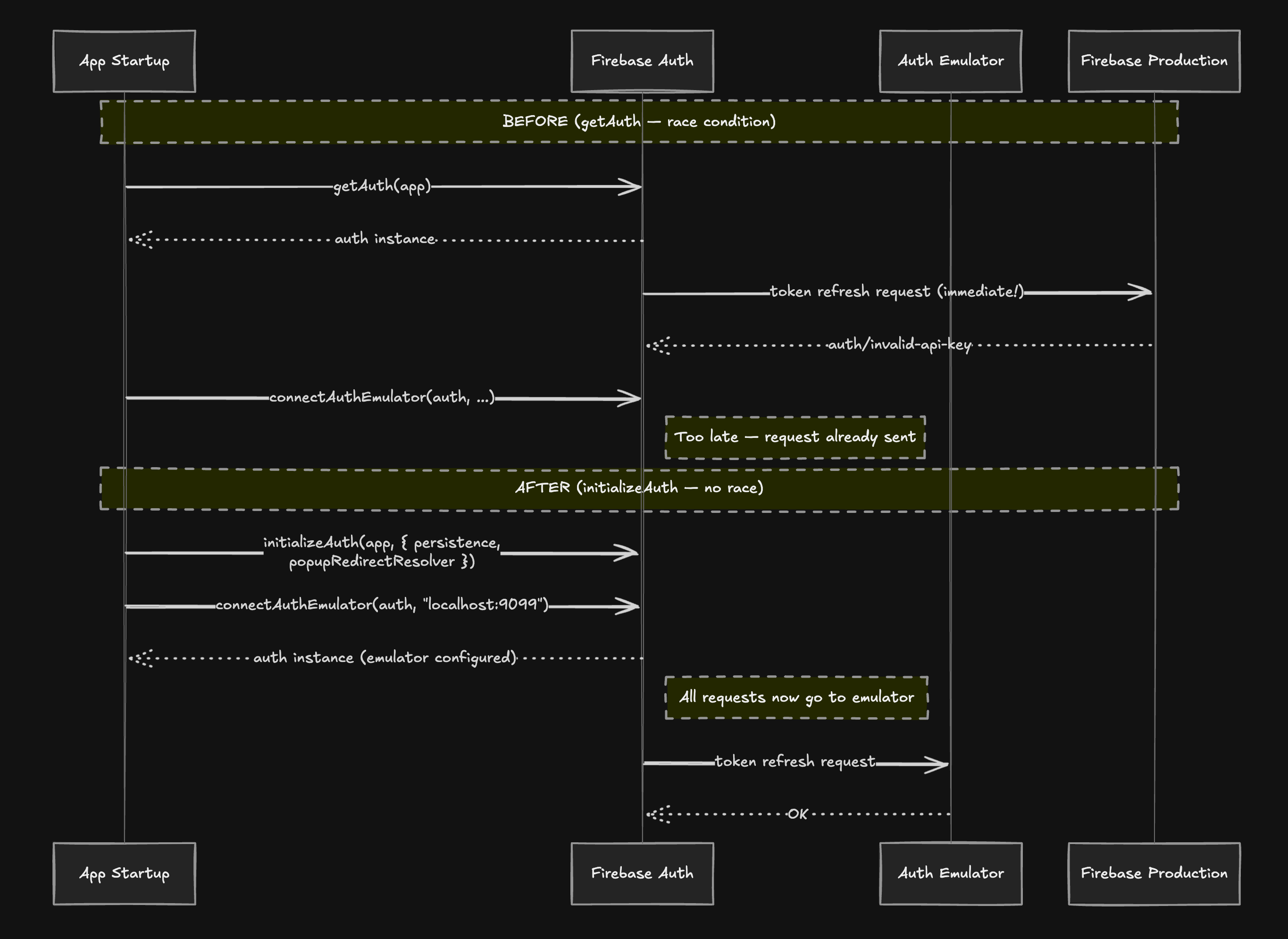
Even after fixing the Admin SDK, contributors saw auth/invalid-api-key errors in the console when the app loaded. The client SDK was going to production Firebase.
The code in providers.tsx looked like this:
// providers.tsx — the old code
const auth = getAuth(app);
if (process.env.NODE_ENV === "development") {
  connectAuthEmulator(auth, "http://localhost:9099");
}
This looks correct. It isn't.
The Race Condition
Firebase Auth, on initialization via getAuth(), immediately schedules a token refresh request. This is not documented prominently, but it happens — Auth needs to check whether the current user session is still valid. By the time connectAuthEmulator() runs on the next line, that request has already been dispatched to https://identitytoolkit.googleapis.com with your (fake, placeholder) API key. The emulator never intercepts it.
Result: auth/invalid-api-key. The placeholder key is, predictably, invalid with the real Firebase service.
The Fix: initializeAuth with Options
The solution is to switch from getAuth to initializeAuth, which accepts configuration...including emulator settings...at construction time, before any network activity:
// providers.tsx — the fix
import {
  initializeAuth,
  browserLocalPersistence,
  browserPopupRedirectResolver,
  connectAuthEmulator,
} from "firebase/auth";

const auth = initializeAuth(app, {
  persistence: browserLocalPersistence,
  popupRedirectResolver: browserPopupRedirectResolver,
});

if (process.env.NODE_ENV === "development") {
  connectAuthEmulator(auth, "http://localhost:9099", { disableWarnings: true });
}
Now the emulator URL is part of the Auth instance's configuration from the moment of construction. No race condition. There's nothing to race.
The browserPopupRedirectResolver Gotcha
Here's a subtlety that will absolutely burn you if you miss it.
getAuth() bundles browserPopupRedirectResolver by default. initializeAuth() does not. If you switch from one to the other without explicitly passing browserPopupRedirectResolver, any call to signInWithPopup() (Google sign-in, GitHub sign-in, etc.) will throw auth/argument-error.
This is a silent breaking difference. The error message doesn't say "you forgot to pass the popup resolver" — it says auth/argument-error, which could mean almost anything. If you're migrating from getAuth to initializeAuth, always pass both browserLocalPersistence and browserPopupRedirectResolver unless you have a specific reason not to.
Problem 4: A Blank App and the Seed Script
What Broke
Even with emulators running and the app not crashing, contributors saw... nothing. Empty lists. "No mentors found." "No projects." A blank slate that gave no signal about whether anything was working.
The Fix: seed-firestore.ts
The seed script uses @ngneat/falso to generate realistic fake data:
// scripts/seed-firestore.ts (excerpt)
import {
  randUser,
  randParagraph,
  randPastDate,
  randJobTitle,
} from "@ngneat/falso";

const FAKE_USERS = Array.from({ length: 8 }, () => randUser());

// Critical: lowercase the username to match query expectations
function username(n: number) {
  return FAKE_USERS[n].username.toLowerCase();
}

async function seedMentorshipProfiles() {
  // 4 mentors
  for (let i = 0; i < 4; i++) {
    const u = FAKE_USERS[i];
    await db.collection("mentorship_profiles").doc(username(i)).set({
      username: username(i),
      displayName: `${u.firstName} ${u.lastName}`,
      role: "mentor",
      discordUsername: u.username,
      bio: randParagraph(),
      skills: [randJobTitle(), randJobTitle()],
      acceptingMentees: true,
    });
  }

  // 4 mentees
  for (let i = 4; i < 8; i++) {
    const u = FAKE_USERS[i];
    await db.collection("mentorship_profiles").doc(username(i)).set({
      username: username(i),
      displayName: `${u.firstName} ${u.lastName}`,
      role: "mentee",
      discordUsername: u.username,
      bio: randParagraph(),
    });
  }
}
The script seeds 8 users, 8 mentorship profiles, 6 sessions, 5 ratings, 4 projects, and 3 roadmaps — enough data to make every major feature of the app feel populated and testable.
The Silent Failure: The Project ID Trap
During development of the seed script, we hit a maddening issue: the seed ran successfully (no errors), but the Emulator UI showed zero documents.
Root cause: the emulators were started under the default project from .firebaserc (code-with-ahsan-45496), but the seed script wrote to demo-codewithahsan. Two separate namespaces. Data existed in one, app queried the other.
The fix was to ensure the emulators command and the seed script agree on the project ID. The --project demo-codewithahsan flag in the npm run emulators script is the source of truth. The seed script respects it via:
# package.json seed script
"seed": "FIRESTORE_EMULATOR_HOST=localhost:8080 NEXT_PUBLIC_FIREBASE_PROJECT_ID=demo-codewithahsan npx tsx scripts/seed-firestore.ts"
Both sides now explicitly reference demo-codewithahsan. The Emulator UI shows everything.
Schema Correctness: Seed Against the Types, Not Assumptions
The first iteration of the seed had wrong field names. name instead of title on projects. Wrong status enum values for sessions. Mentorship profiles seeded into the wrong collection.
The lesson: when writing a seed script, cross-reference with the actual TypeScript types and the API route code that reads the data, not your memory of what the schema probably is. A seed that writes to the wrong fields is worse than no seed, because it makes the app look broken even when it isn't.
The Lowercase Username Bug
The most subtle bug: profile lookup queries in the codebase do:
.where("username", "==", username.toLowerCase())
The seed stored usernames from randUser(), which generates mixed-case values like JohnDoe42. The query would lowercase the lookup value but find nothing because the stored value was JohnDoe42, not johndoe42.
The fix was a one-liner:
function username(n: number) {
  return FAKE_USERS[n].username.toLowerCase(); // This line matters
}
But the symptom...404s on mentor profile pages...gave no hint about case sensitivity. It looked like the data wasn't seeded, when actually it was seeded incorrectly. Always store and query on the same normalization.
Problem 5: The Admin Dashboard Needed a Document That Didn't Exist
The Auth System Architecture
The admin system uses a two-factor authentication model: Firebase Auth first (any account can sign in), then a separate admin password verified against a bcrypt hash stored in Firestore:
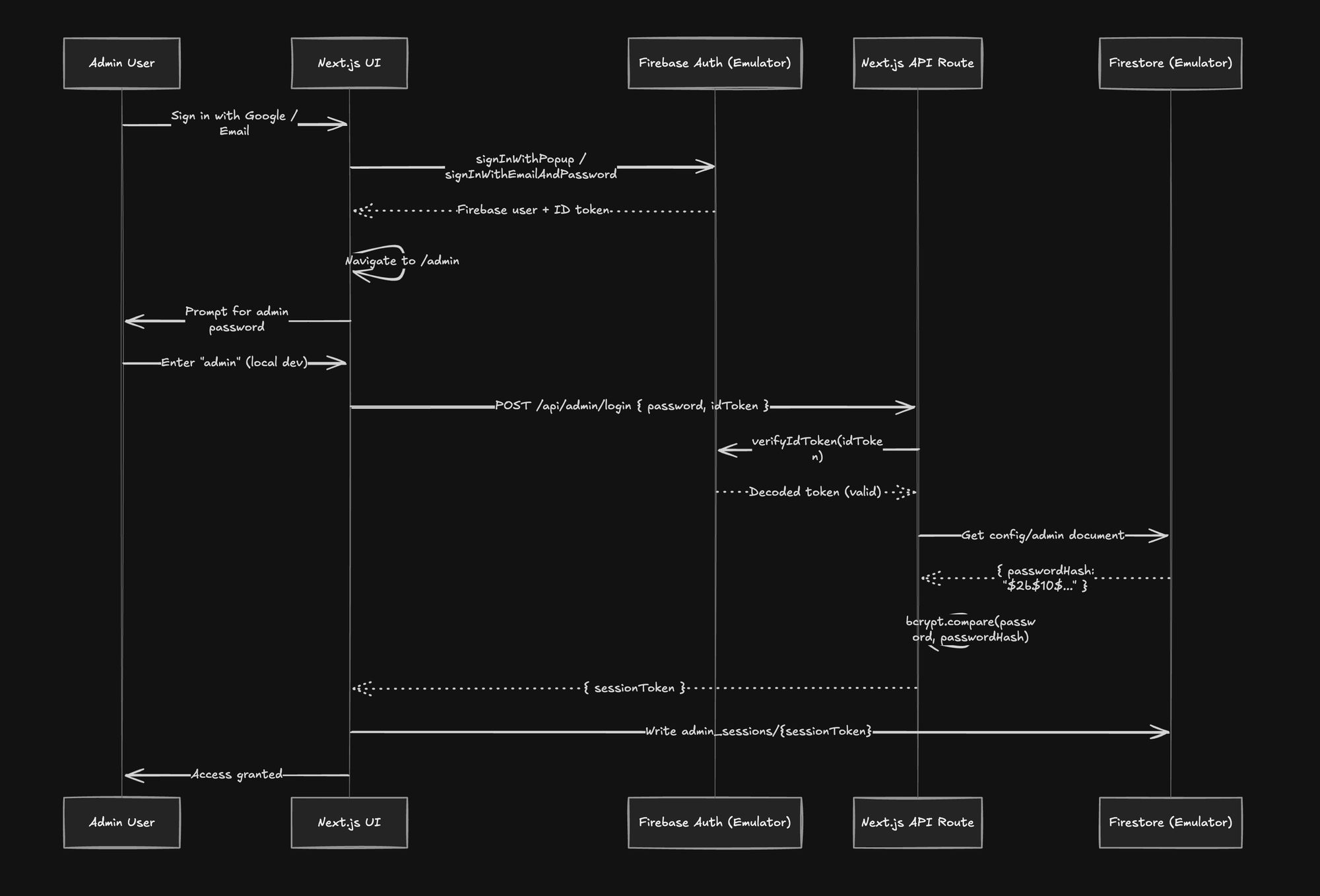
There are no hardcoded JWTs. No role field on the user document. Admin access is controlled by the config/admin Firestore document, which contains a bcrypt hash.
What Broke
That document didn't exist in the emulator. Without it, the admin login API route read an empty document, bcrypt.compare() had nothing to compare against, and the login silently failed.
The Fix
Add the document to the seed script:
// scripts/seed-firestore.ts
import * as bcrypt from "bcrypt";

async function seedAdminConfig() {
  // Local dev password is "admin" — non-sensitive, not production
  const passwordHash = await bcrypt.hash("admin", 10);
  await db.collection("config").doc("admin").set({ passwordHash });
  console.log("Seeded admin config (password: admin)");
}
Local admin access is now: sign in with any account, navigate to /admin, enter admin. Discoverable. Documented. No tribal knowledge required.
Problem 6: "Creator Profile Not Found" — A Case Study in the Right vs. Wrong Fix
The Symptom
A newly signed-up contributor creates an account, navigates to /projects/new to create a project, and gets an error banner: "Creator profile not found."
The API route that handles project creation fetches the creator's mentorship profile to get their discordUsername. If there's no profile, it returns a 404.
The Wrong Fix (First Attempt)
The obvious fix is: if there's no mentorship profile, fall back to the users collection:
// Tempting but wrong
const profile = await getMentorshipProfile(username) || await getUser(username);
This makes the immediate error go away. It also creates a silent downstream failure: when a project is approved, the system calls createProjectChannel(profile.discordUsername). The users collection doesn't have discordUsername. The call silently fails. A Discord channel that should have been created never gets created, and nobody gets notified.
The immediate error was telling us something true: the user doesn't have a mentorship profile, and a mentorship profile is required. Suppressing that truth creates worse problems downstream.
The Right Fix: Guide the User to Create a Profile First
Keep the API guard. Fix the UI to handle the 404 gracefully:
// In /projects/new page
useEffect(() => {
  if (!loading && user && !profile) {
    router.push("/mentorship/onboarding?redirect=/projects/new");
  }
}, [loading, user, profile, router]);
And in the onboarding completion handler, respect the ?redirect parameter:
// In onboarding form submission handler
const redirectTo = searchParams.get("redirect") || "/mentorship/dashboard";
// Give them a moment to see the success state
setTimeout(() => router.push(redirectTo), 2000);
The user flow is now: try to create a project → redirected to onboarding → create profile → redirected back to project creation. Complete. Correct. No silent failures.
The Architecture Lesson
Silent failures downstream are categorically worse than loud failures at the entry point. A 404 at the API layer is honest...it tells you exactly what's missing and where. Papering over it with a fallback that "almost works" creates bugs that surface weeks later in production, in a completely different part of the system, with no connection back to the original cause.
When you see a 404, ask: is this a bug in the gate, or is the gate correctly telling me something is missing? In this case, the gate was right. The UI needed to listen to it.
Problem 7: The Vercel Build Failure That Appeared After "Done"
What Broke
The PR was reviewed, approved, merged. Vercel picked up the merge and ran a production build. The build failed:
Type error: Object literal may only specify known properties,
and 'gender' does not exist in type 'FakeOptions'.
The seed script had:
const user = randUser({ gender: "male" });
This worked locally because the local node_modules had an older cached version of @ngneat/falso whose TypeScript types included the gender option. The CI environment pulled a fresh install, and the current version of the library had removed gender from its FakeOptions type.
The Fix
Remove the option. randUser() works perfectly without it.
// Before
const user = randUser({ gender: "male" });

// After
const user = randUser();
The Lesson
Type definitions can drift between local and CI environments even when package-lock.json is present, if the library publishes type-only changes. Always run tsc --noEmit as part of your local validation before opening a PR. Had that been in the pre-commit checks or pre-push hooks, this would have been caught in 30 seconds instead of after a failed production deploy.
The Before and After
Before: The Contributor Funnel
After: The New Contributor Flow
git clone https://github.com/ahsanayaz/code-with-ahsan.git
cd code-with-ahsan
npm install
cp .env.example .env.local

# Terminal 1
npm run emulators

# Terminal 2 (after emulators are ready)
npm run seed
npm run dev
Five commands. Under five minutes. A fully populated, fully functional app with realistic data. Admin access: sign in with any account, navigate to /admin, password is admin.
No Firebase project. No billing. No service account. No tribal knowledge.
Contributor DX as a First-Class Architectural Concern
The problems documented above weren't bugs in the traditional sense. I.e. the app worked correctly for people with the right setup. They were architectural gaps: places where the system assumed context that contributors didn't have.
DX debt accumulates slowly. Each implicit assumption..."you'll have a service account," "you'll know the env var names," "you'll know to create a profile before a project"...seems minor in isolation. Compounded, they create a barrier that filters out contributors who don't already have deep context. Which is most contributors.
The fixes here share a common pattern: make the system state explicit rather than implicit. Emit a clear error instead of a silent failure. Guide the user to the right state instead of hoping they figure it out. Test the zero-knowledge setup, not just the fully-configured one.
The Firebase Admin SDK rewrite is the clearest example. The old code assumed a file existed at a specific path. The new code makes the initialization path explicit, documents it in the code, and fails loudly with actionable messaging if none of the expected configurations are present. A new contributor reading firebaseAdmin.ts now understands exactly how the app initializes in each environment without needing to ask anyone.
A codebase that new contributors can navigate confidently is not a luxury. It's what determines whether your open-source project gets contributions or gets archived.
A Note on AI-Assisted Architecture: What This Whole Session Actually Looked Like
I ran this entire debugging session using Claude Code. An AI assistant that runs in the terminal and can read files, execute bash commands, search the codebase, and write or edit code directly. As a GDE in AI, I want to be specific about what that actually looked like in practice, because "I used AI to help" has become almost meaningless as a statement.
This is what it meant here.
Where the AI Genuinely Changed the Trajectory
The initializeAuth race condition was the most impressive moment of the session. The error showing up was auth/invalid-api-key. Every human instinct says: check the key. Is it in the right .env file? Is the variable name correct? I was already mentally navigating to the Firebase console.
Instead, the AI looked at initialization order. It identified that Firebase Auth fires a token refresh request before connectAuthEmulator has a chance to intercept it — meaning the SDK tries to reach production with no valid key before the emulator is wired up. That's not a "check your config" problem. That's a sequencing problem. Finding that root cause through Googling would have cost thirty minutes minimum.
The creator profile architectural catch was a different kind of useful. The initial fix — fall back to the users collection if no mentorship_profiles doc exists — was written by the AI, and it was wrong. But before moving on, the AI traced the downstream effects: when a project gets approved, createProjectChannel(creatorDiscordUsername) is called, and that field lives on mentorship_profiles, not users. Silently allowing project creation without a profile would have caused failures much later, in a completely different part of the system, with no obvious connection to this code path. The fix was reverted and replaced with a UI-level redirect.
Cross-referencing schema across files is tedious work that humans do slowly and with errors. The seed data had wrong field names (name instead of title) and invalid status values. Reconstructing the correct schema meant reading TypeScript type definitions, API route handlers, and Firestore security rules together. The AI did this in parallel.
The Vercel build failure was the mundane version of this: screenshot of build logs, AI reads the error, finds the exact line (gender does not exist in type FakeOptions), fixes it in under a minute. No context switching, no Stack Overflow tab.
Where Human Judgment Was Still Required
The AI could not diagnose why the seed data was invisible in the Emulator UI. That required noticing the mismatch between the project ID in .firebaserc and the one hardcoded in the seed script — a namespacing issue that only became clear after reading the Firebase Emulator docs. No amount of code-reading surfaces that. You had to know where to look.
The wrong fix on creator profile is also worth being honest about: the AI wrote the wrong fix first. It took a human stepping back and asking "what happens downstream when this project gets approved?" to trigger the re-evaluation. The AI then reasoned correctly — but only after being asked the right question.
Architectural scope decisions stayed with me throughout. Whether to allow a user to be both mentor and mentee (flagged, deferred), whether the admin auth needed a full rework or just a seed document — those were judgment calls, not code problems.
The Actual Insight: Context Quality Over Prompt Cleverness
Patterns that worked in this session:Share the actual error (screenshot or raw log), not a description of itHave the AI read the relevant source files before it suggests anythingAsk "what are the downstream effects of this fix?" as a forcing function before accepting any patch
The worst way to use AI for debugging is to describe the problem in words and ask for a solution. The best way is to give it the error, the files, and ask it to explain the root cause before it touches any code.
AI assistance scales with context quality, not prompt cleverness. That's the practitioner takeaway. When the context was thin (the namespacing issue), the AI couldn't help. When the context was rich, it moved faster than I could have alone.
That asymmetry is worth understanding before you decide how to integrate these tools into your own workflow.
Acknowledgments
This work was done in PR feat/improve-contributor-dx on the CodeWithAhsan repository. The platform is open source at github.com/ahsanayaz/code-with-ahsan. Contributions welcome. Setup takes five minutes now.